
Google can pick up shipping and return policy information from several places. Adding another field is the easy part. The hard part is knowing the scope of each source, which one wins when they overlap, and when product-level data should override a general policy.
What changed between 2024 and 2025
Google rolled these options out in stages:
- 11 June 2024: Google added support for an organisation-level return policy using
MerchantReturnPolicynested underOrganization. Google positioned this as particularly useful for merchants without a Merchant Center account. - 11 July 2024: Google added a Search Console interface for managing Merchant Center account-level shipping and return policies. At launch, this route depended on a configured Merchant Center account.
- 12 November 2025: Google expanded the Search Console feature to websites it identifies as online merchants, even when they do not have a Merchant Center account. At the same time, Google added organisation-level shipping policy markup using
ShippingService.
The 2025 announcement did not replace Merchant Center, feeds or product-level markup. It added two more accessible ways for merchants without Merchant Center to provide general shipping and return information: Search Console settings or organisation-level structured data.
What takes precedence
Google's broader merchant listing documentation gives the following order of precedence, from strongest to weakest:
- Product-level feeds submitted in Merchant Center
- Settings submitted through the Content API for Shopping
- Settings in Merchant Center or Search Console
- Product-level merchant listing markup
- Organisation-level markup
Google's dedicated shipping policy documentation and return policy documentation show the same order but omit product-level Merchant Center feeds, focusing instead on account settings and structured data.
The practical interpretation is straightforward:
- Product-level Merchant Center data wins when it exists for a specific product.
- Merchant Center or Search Console settings override structured data on the website.
- Product-level structured data overrides organisation-level structured data.
- Organisation-level markup acts as the general fallback.
Scope comes before precedence
The precedence list is easy to misread as a recommendation to put everything into the highest-ranking source. It is the misreading I see most often, and it is not what Google says.
Shipping and return configurations can exist at different scopes:
- General policy: applies to most or all products in a market.
- Product group exception: applies to a category such as oversized goods, final-sale items or personalised products.
- Individual product exception: applies to one specific offer.
A product-level source wins only where it overlaps with a broader policy. It does not mean that the broader policy is ignored for the rest of the catalogue.
Merchant Center: the primary route if you already use it
If you already operate through Merchant Center, the cleanest setup is normally:
- Configure the standard shipping and return policies at account level.
- Use product-level feed attributes only where a product needs different treatment.
- Keep the website, checkout, Merchant Center and any structured data aligned.
For shipping, Google says the product-level shipping attribute should be used when account-level settings are missing or when an individual product needs an override, such as a bulky or fragile item.
For returns, create a default return policy in Merchant Center. If certain products have different rules, create an exception policy and assign it with return_policy_label, or use the product-level returns attribute where appropriate. Google explicitly recommends using product-level return data sparingly and managing most of the catalogue through account-level policies.
Search Console: a simplified general-policy interface
Search Console now allows websites identified by Google as online merchants to add simplified shipping and return policies under Settings › Shopping › Shipping and returns. A Merchant Center account is no longer required.
Search Console supports:
- Delivery time
- Shipping cost
- Return window
- Return cost
You need owner or full-user access to the Search Console property. If a Merchant Center account already exists, it must be associated with the Search Console property.
Search Console settings take precedence over structured data on the website. However, policies created or edited in Merchant Center are managed in Merchant Center and are not editable in Search Console. Search Console may show a link to those Merchant Center policies for 30 days after the Merchant Center change.
Organisation-level structured data: the code-managed general policy
Organisation-level structured data is the code-based alternative for a policy that applies to most or all products.
Shipping
Use ShippingService nested under Organization with hasShippingService. Google recommends placing the markup on the page that describes the business's shipping policy. It does not need to appear on every page.
Returns
Use MerchantReturnPolicy nested under Organization with hasMerchantReturnPolicy. This can describe the general return window, fees, methods, conditions and policy URL.
For an online or local retailer, Google recommends using an appropriate subtype such as OnlineStore or LocalBusiness.
Product-level structured data: use it for exceptions or product-specific policies
When a specific product differs from the standard policy:
- Use
shippingDetailswithOfferShippingDetailsunderOffer. - Use
hasMerchantReturnPolicywithMerchantReturnPolicyunderOffer.
Product-level structured data overrides organisation-level structured data for that product. Google's dedicated shipping and return policy pages place it below Content API settings and Merchant Center or Search Console settings. The broader merchant listing documentation additionally places product-level Merchant Center feeds above all of those sources.
The decision tree
Start by separating the general policy from product exceptions.
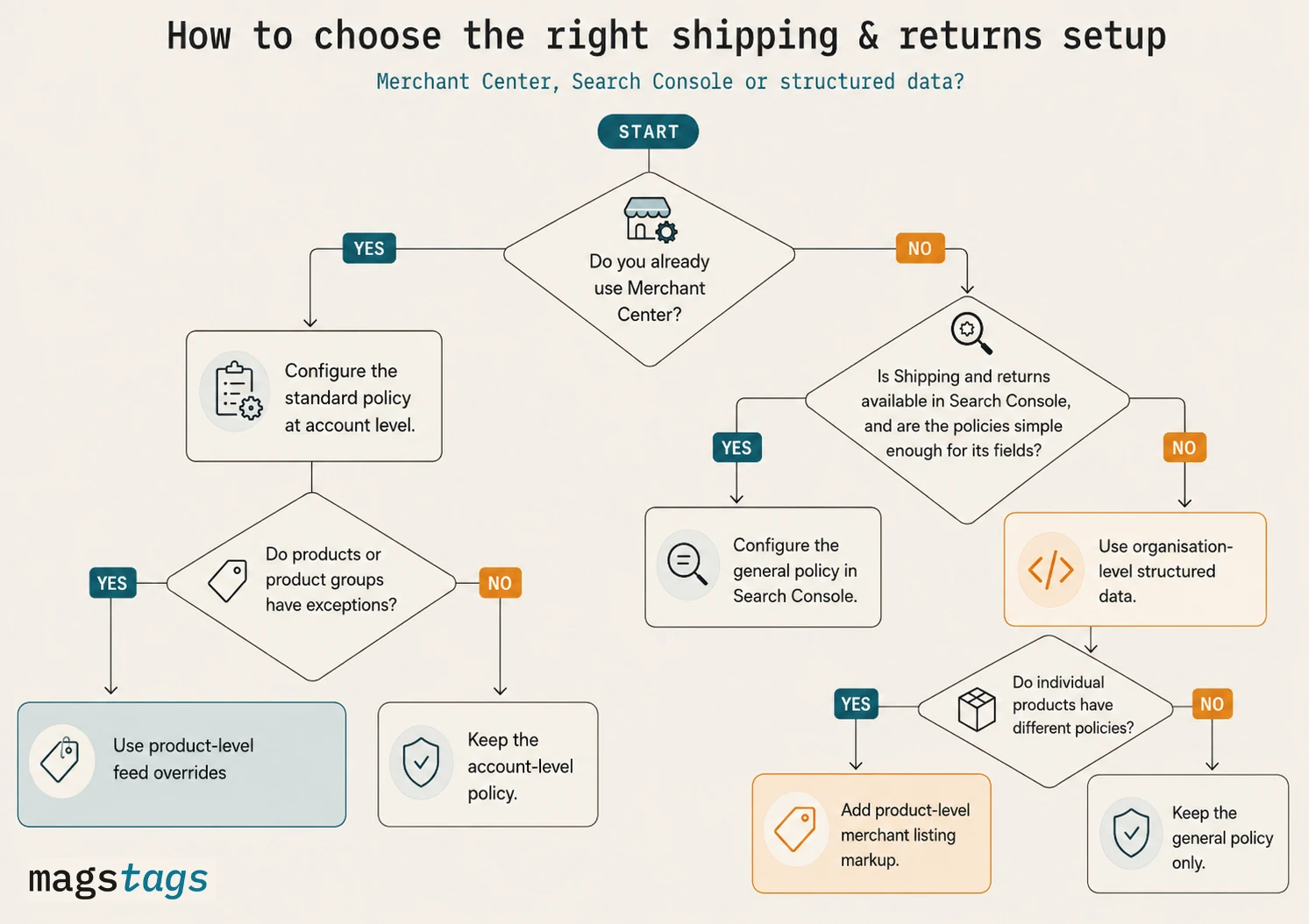
| Question | Use this source | Why |
|---|---|---|
| Do you already use Merchant Center? | Merchant Center account settings | Configure the standard shipping and return policies here. A product feed does not automatically make product-level feed attributes the correct default. |
| Do some products have different rules? | Product-level feed overrides | Use shipping, return_policy_label or product-level returns only for the products or groups that genuinely differ. |
| No Merchant Center: is the Search Console feature available and are the policies simple? | Search Console | Use the simplified country-level UI for delivery time, shipping cost, return window and return cost. |
| No Merchant Center: do you need richer code-managed general policies? | Organisation-level structured data | Use ShippingService and MerchantReturnPolicy on the relevant policy pages. |
| Does one product differ from the organisation policy? | Product-level structured data | Add an offer-level override for that product. Do not duplicate identical product-level policy markup across the catalogue merely because it is possible. |
What not to do
- Do not populate product-level feed shipping for every SKU simply because a feed exists. Start with account-level settings and override only where needed.
- Do not call organisation-level markup a returns-only option. Since November 2025, Google supports both organisation-level shipping and return policies.
- Do not say that Search Console requires Merchant Center. That stopped being true when the feature expanded in November 2025.
- Do not say every stronger source completely replaces every weaker source everywhere. The relevant question is whether the sources overlap for the same product, country and policy condition.
- Do not assume a valid Rich Results Test means the markup is Google's effective source. The test validates the markup; it does not tell you whether Merchant Center, an API setting or Search Console is taking precedence.
A worked example
A UK retailer has:
- A general Merchant Center shipping service: free over £50, otherwise £3.99
- A product-level feed
shippingvalue of £9.99 for one oversized product - Product-level JSON-LD saying £4.99 for the same oversized product
- Organisation-level shipping markup describing the general £3.99 policy
For the oversized product, the product-level feed value has the highest precedence, so Google uses the £9.99 feed configuration where the sources overlap. For products without a product-level feed override, the Merchant Center account-level service remains applicable. The organisation markup is the weakest source and the product-level JSON-LD does not override Merchant Center.
This does not mean the organisation markup is globally useless or that every product needs a feed-level value. It means each layer applies according to its scope and precedence.
Mismatch risk
Google requires submitted shipping costs to match the website. Search Console documentation says a listing might be rejected if Google finds a lower shipping cost in the listing than on the website. That is a risk statement, not a guarantee that every mismatch triggers an immediate automated rejection.
The operational requirement is still strict: compare the effective Google source against the visible policy and checkout logic, not just against the structured data.
The better governance model
The right conclusion is not “choose one system and remove everything else.” It is:
- Choose one source for the general policy. Usually Merchant Center, Search Console or organisation-level structured data.
- Choose one controlled exception mechanism. Usually product-level feed data or product-level merchant listing markup.
- Keep every overlapping representation aligned. Website copy, checkout, Merchant Center, feeds, APIs and structured data must not contradict each other.
- Document ownership. Define who changes the general policy, who creates exceptions and which systems must be updated.
Frequently asked questions
Does having a Merchant Center feed mean I should set shipping per product?
No. Google recommends starting with account-level shipping settings. Use the product-level shipping attribute when the account policy does not cover a product or when that product needs an override.
Can I use Search Console without Merchant Center?
Yes, provided Google identifies the site as an online merchant and exposes the Shipping and returns setting for the property.
Should I use Search Console and organisation-level structured data together?
You can, but Search Console settings take precedence over website structured data where they overlap. Using both only makes sense when the markup serves an additional documented purpose and is kept aligned.
Does product-level markup override organisation-level markup?
Yes, for that product. Google explicitly recommends product-level shipping or return markup when a product needs to override the general organisation policy.
Where does Merchant API fit?
Merchant API is replacing Content API for Shopping and supports account-level shipping settings and online return policies. Google's current shipping, return and merchant listing precedence sections still use the term Content API for Shopping. The article therefore preserves Google's published terminology while noting the ongoing API migration.
Sources and further reading
- Google Search Central: Merchant listing structured data and the published precedence order
- Google Search Central: More ways to share shipping and returns policies, 12 November 2025
- Google Search Console Help: Shipping and return settings
- Google Search Central: Organisation-level shipping policy structured data
- Google Search Central: Merchant return policy structured data
- Google Merchant Center Help: Product-level shipping attribute
- Google Merchant Center Help: Return policies and exception labels
- Google Merchant API: Shipping settings