Valid schema and effective schema are not the same thing. Most ecommerce sites have some version of product structured data in place. Fewer have schema that's accurate, consistent across page types, and aligned with the Merchant Center feed.
This is about the gap between the two: what actually earns rich results in Google Shopping and organic search, what to implement first, and what to stop doing.
The gap between "valid schema" and "schema that works"
Passing the Rich Results Test means your markup is parseable. It doesn't mean Google is using it, that the data matches what's on the page, or that you've implemented the right schema type for the feature you're trying to trigger.
At scale, the distinction matters more because the errors compound. If your product template generates an incorrect price property on 3% of pages, that's 1,500 pages with bad data on a 50,000 SKU site. Google doesn't flag these individually. You find them in Search Console's Rich Results report, months later, as a spike in "items with issues."
What actually earns rich results in 2026
Four SERP features are available to ecommerce sites through structured data. Each has a specific schema requirement. Miss the schema, miss the feature.
Price and availability annotations in organic results
Price, star rating, and review count directly in the search result, before a user clicks anything. That's what Merchant Listing schema does when implemented correctly.

This requires a Product with a valid Offer: price, priceCurrency, availability, and for purchase pages, AggregateRating if you have reviews. Use Merchant Listing schema on direct purchase pages. Generate the JSON-LD here.
Free product listings in Google Shopping
The unpaid product tiles in the Shopping tab, price, retailer, delivery, and star ratings, all without a paid ad.
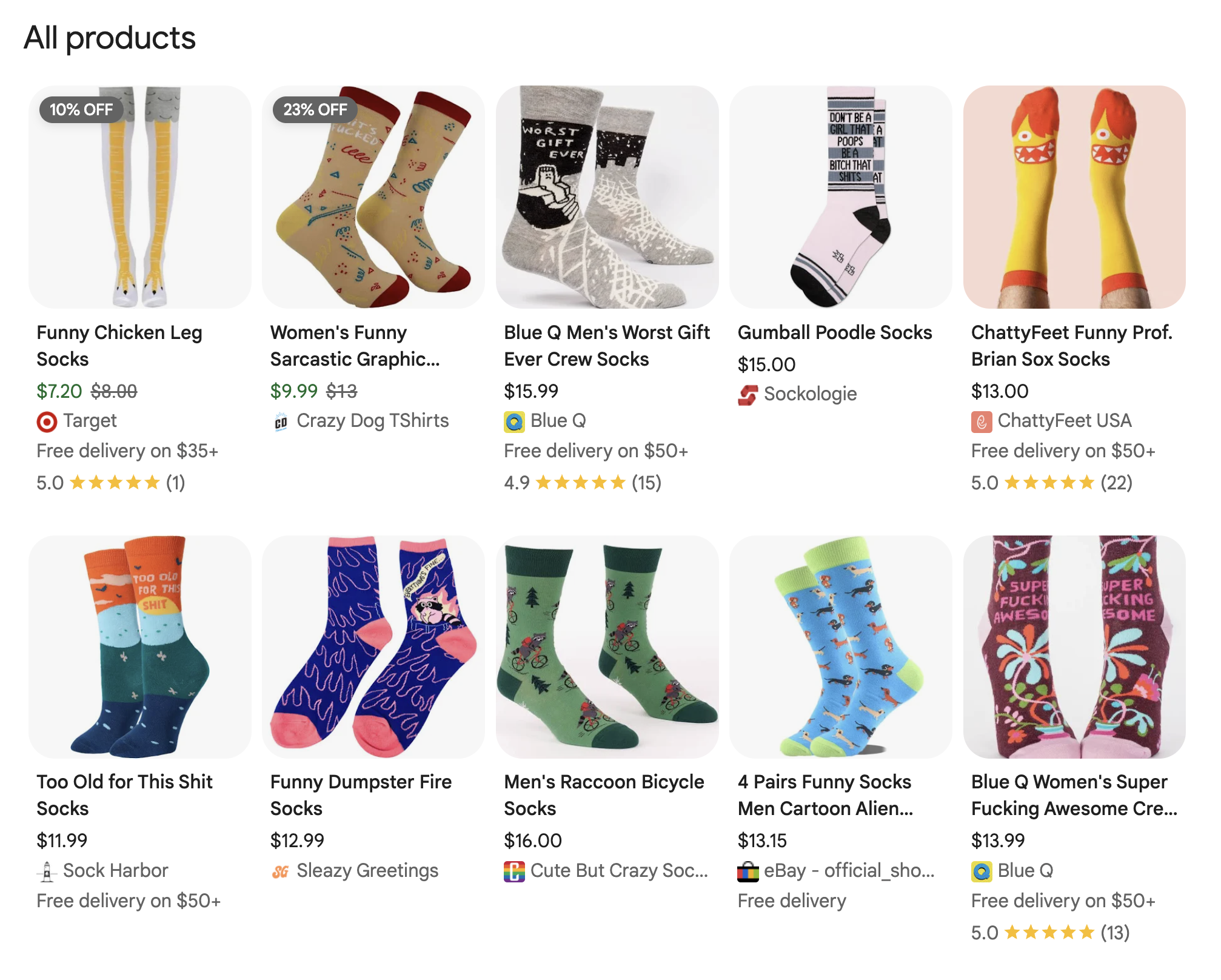
Merchant Listing schema is the on-page signal; your Merchant Center feed is the other. Both need to agree on price, availability, and identifiers. Google uses GTIN, MPN, and brand to match your listing to a known product entity, not your internal SKU. For the full breakdown: Product Identifiers for Ecommerce SEO.
Variant-level Shopping features
Colour swatches, size selectors, and variant-specific pricing directly in Shopping results, before a user lands on your site.
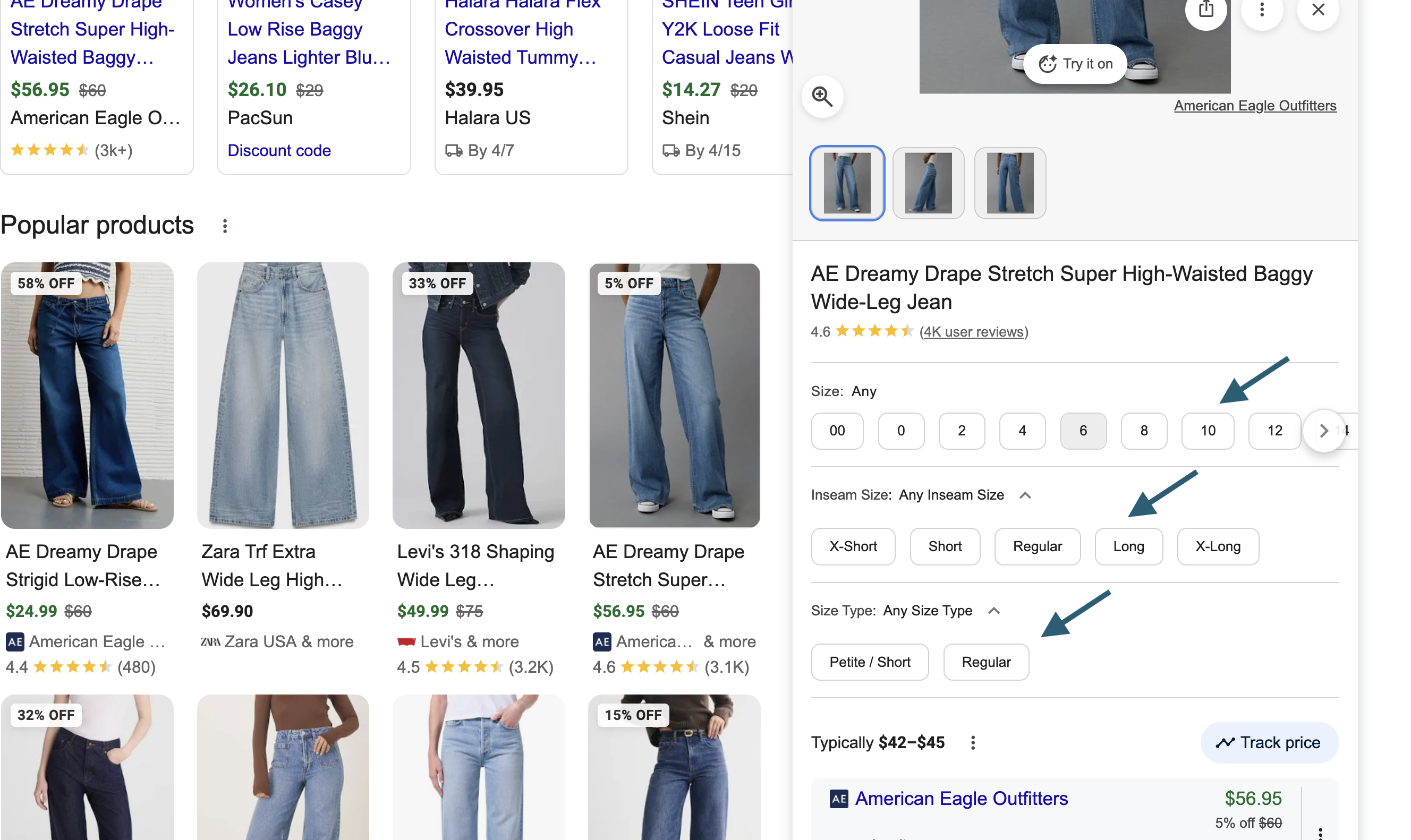
If all variants are on a single URL: ProductGroup with hasVariant, each variant as a nested Product with its own Offer, image, and identifier. If each variant has its own URL: isVariantOf on each variant page linking back to the ProductGroup via a shared @id. Most enterprise sites haven't implemented either correctly and are leaving visible CTR gains in Shopping on the table.
Shipping and returns annotations

"Free delivery over £20", "Free returns", "Get it by Thu Apr 3", the lines that appear beneath the price on Shopping tiles, and since April 2023, also in an expanded section below the meta description on organic product page results. These come from ShippingDetails (shippingRate + deliveryTime) and ReturnPolicy (returnPolicyCategory + merchantReturnDays) in your schema, cross-referenced with your Merchant Center feed. The lowest implementation effort of the four. Most competitors don't have it, and it shows directly in the result, before a click.
The prioritisation order
If you're deciding where to spend implementation effort, this is the sequence:
Priority 1
Product + Offer with required properties
No price, no rich results. Get this right across 100% of PDPs before doing anything else. Required: name, image, offers with price, priceCurrency, availability.
If your template is missing any of these on any page type (bundle pages, gift cards, pre-order items) fix that first.
On editorial or review pages rather than direct purchase pages, use Product Snippet schema instead. Generate it here.
Priority 2
ShippingDetails + ReturnPolicy
Low implementation cost, direct SERP feature. Most competitors don't have it.
Two properties trigger delivery date annotations: shippingRate and deliveryTime. The return policy annotation requires returnPolicyCategory and merchantReturnDays. Neither requires a dev sprint if your shipping and returns policy is consistent.
Priority 3
ProductGroup + hasVariant
High value for variant-heavy catalogues. The payoff is colour swatches, size-specific pricing in Shopping, and correct variant-to-query matching. The implementation depends on your URL structure: if all variants live on one URL, use ProductGroup with nested hasVariant Product entities. If each variant has its own URL, use isVariantOf on each variant page linking back to the ProductGroup via a shared @id. Not both, one or the other, depending on your architecture.
Start with your highest-traffic categories before rolling out site-wide.
Full implementation guide: Product Variants Schema Markup.
Priority 4
BreadcrumbList + AggregateRating
BreadcrumbList: Low effort, improves SERP display, helps Google understand site hierarchy. Every page template should have this.
AggregateRating: Only implement if you have genuine first-party reviews. Google has penalised sites for manipulative use. If you're importing third-party scores and displaying them as your own, don't.
The price and availability freshness problem
This is the most common cause of schema that validates but doesn't perform.
Google's product data quality guidelines require that the price and availability in your schema match what a user sees when they land on the page. If your schema says £89 and the page shows £79 because of a sale that went live this morning, that's a mismatch. Google will suppress rich results for pages where the data doesn't match. In some cases it will issue a manual action.
At enterprise scale, this happens constantly:
- Sale prices go live before schema is updated, or a caching layer serves stale JSON-LD after the price has changed on the page
- Flash promotions change the displayed price without touching the JSON-LD
- Stock status changes to
OutOfStockbut the schema still saysInStock - Prices are hardcoded in schema templates rather than pulled dynamically from the product data layer
The fix is not complicated, but it requires a decision: either your schema is generated dynamically from the same data source as the page, or you accept that there will be a lag and build a monitoring workflow to catch mismatches.
Sale prices, strikethrough pricing and price mismatch
Sale pricing is where the freshness problem gets acute and the consequences get serious. A price mismatch between your schema or feed and what's on the page isn't just a rich result suppression, it can lead to product disapprovals and, in persistent cases, account suspension.
How schema.org handles sale prices
There's no salePrice property in schema.org. When a product is on sale, you update price to the sale price and add priceValidUntil with the sale end date. Google uses priceValidUntil to determine eligibility for price drop annotations in Shopping. Without it, the reduced price is treated as the new regular price rather than a temporary promotion.
Strikethrough pricing
The original price shown crossed out next to the sale price in Shopping results is driven by Google's price tracking — Google records historical prices and displays the drop when the current price is lower. You can signal the original price using PriceSpecification with a priceType of https://schema.org/ListPrice alongside the current Offer price, which is the standard implementation for "was/now" pricing. Many platforms set the current sale price correctly but omit the original price markup entirely.
The mismatch that causes disapprovals
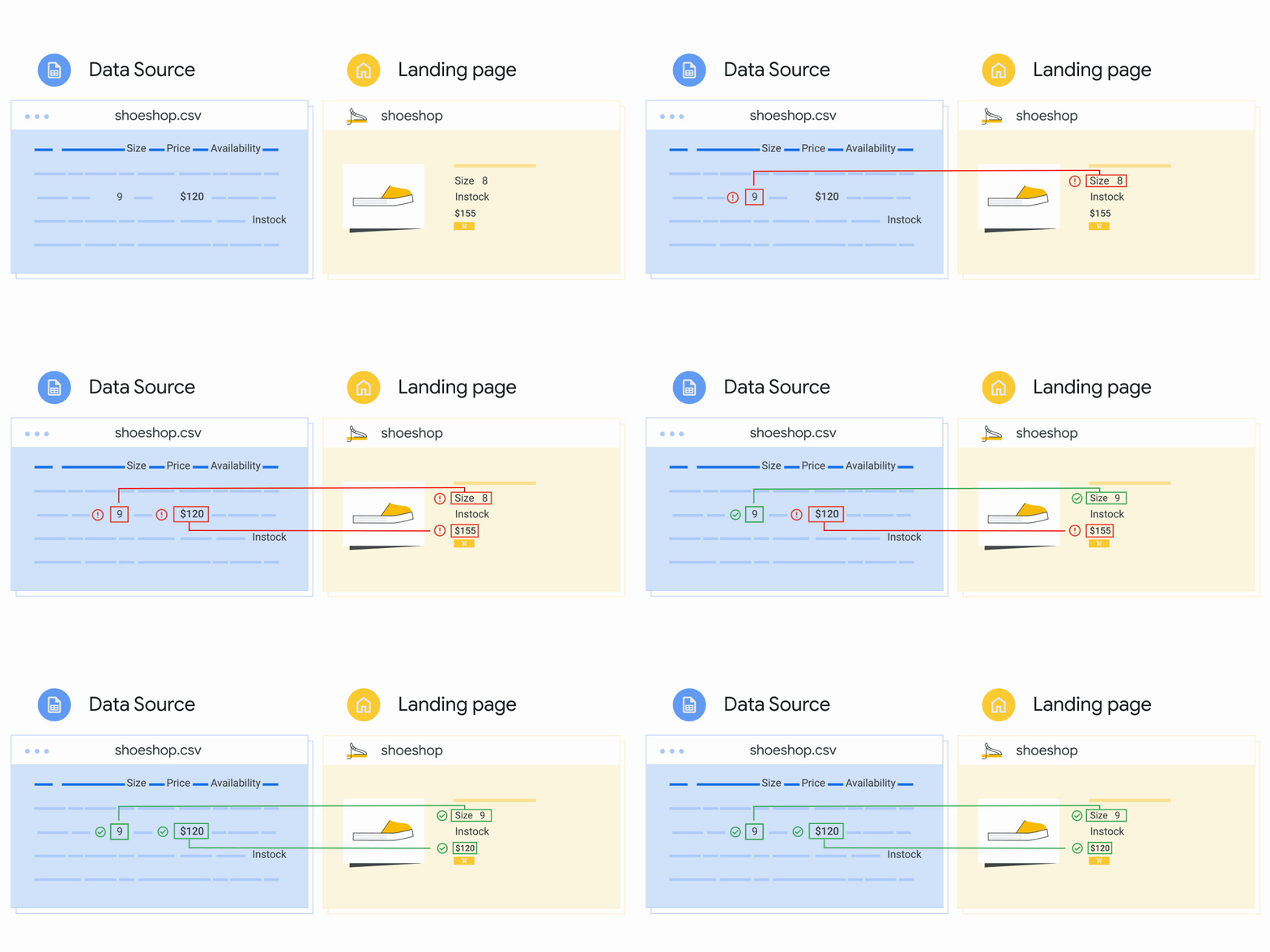
Google's Googlebot routinely crawls your landing pages and compares the price in your Merchant Center feed against what it finds on the page, both in the HTML and in your structured data. When any of these three sources disagree, the product may be disapproved. Googlebot crawls the HTML returned from your server. If your prices are rendered dynamically via JavaScript after page load, Google reads the pre-render HTML price. If that differs from the feed price, you have a mismatch even if the displayed price is correct.
The most common sale price failure pattern at enterprise scale: the sale is live on the page, the schema is updated, but the Merchant Center feed is on a daily upload cycle and still shows the pre-sale price. Or the reverse: the feed is updated but the page is serving cached HTML with the old price. Either way, Google sees a mismatch and acts on it.
The sale_price_effective_date timezone trap
If you're using the sale_price [sale_price] attribute in your Merchant Center feed, the active period must be specified with sale_price_effective_date [sale_price_effective_date], and the timezone must be correct. A wrong start date or timezone offset means the wrong price is shown in Shopping ads and listings during the sale window. This is a silent error: the feed uploads without error, the product doesn't disapprove, but the displayed price is wrong.
Bulk quantities and minimum order requirements
If your products are sold in bulk or have a minimum order quantity, the price submitted must reflect the total for the minimum number of items. A product listed at £2 per unit with a minimum order of 10 should be submitted as £20. Submitting the unit price when the page shows the minimum order price is a mismatch by definition.
If you spot a price mismatch in Merchant Center diagnostics
check the notification timestamp first. Merchant Center reports mismatches at a specific point in time, the product may have been corrected and reapproved since the report was generated. Check the current approval status in the "All products" page before spending time investigating a resolved issue.
Product vs ProductGroup: the decision at scale
The full breakdown, with implementation examples and the most common mistakes by page type, is in Product vs ProductGroup Schema: When to Use Which.
The summary for scale:
Use Product on every PDP. Always.
Use ProductGroup wrapping multiple Product hasVariant nodes when:
- The product has selectable variants a shopper chooses between (colour, size, material)
- Each variant has a distinct URL or at minimum a distinct SKU
- You want Google to surface the right variant for variant-specific queries
Do not use ProductGroup when:
- The product has no variants
- You're wrapping everything in ProductGroup because you read that it's better (it isn't, by default)
What to deprioritise
FAQ schema on PDPs. Google deprecated FAQ rich results for most pages in 2023. FAQ schema on product pages no longer produces the expandable rich result it used to, so it's not worth prioritising for that purpose. Keep it low priority rather than removing it entirely: structured Q&A data on product pages may become more relevant as AI agents and shopping bots use schema to evaluate and compare products. It's not a priority now. It may matter more later.
Speakable. Not widely used, no measurable impact on standard SERP features. Skip it.
VideoObject on PDPs. Only worth implementing if video is central to the product experience and the content is unique per product. A generic product demo video embedded via YouTube does not justify VideoObject implementation across your catalogue.
ItemList / Carousel on category pages. Google's guidance here has been inconsistent and the carousel rich result for product listings is rarely triggered in practice. That said: test it. Schema behaviour changes, AI-driven search surfaces structured data in ways that weren't predictable a year ago, and what doesn't produce a visible SERP feature today may still be read by systems we haven't fully mapped yet. The effort is lower priority than PDP coverage, but it's worth testing on a category subset to see what, if anything, surfaces in your specific vertical.
The three-layer alignment problem
Structured data on the page = Merchant Center feed = Visible PDP content
When all three agree, Google is confident. When they disagree on price or availability, rich results get suppressed. Schema and feed are often managed by different teams on different update cycles. They drift.
- Take a sample of 20 high-traffic PDPs.
- Pull the price from the rendered page (what a user sees).
- Pull the price from the schema (use URL Inspection or view-source).
- Pull the price from the Merchant Center feed for the same product.
- If any of these three numbers disagree, you have a data alignment problem. No amount of schema optimisation will fix it until the sources agree.
Governance: keeping it accurate at scale
Schema decays. Platforms get updated, templates get modified, new page types get added. The schema that was accurate when it was implemented is not guaranteed to be accurate six months later.
A minimal governance workflow for enterprise e-commerce:
- Weekly: Check Search Console's Rich Results report for items with issues. Investigate any new error types, they usually indicate a template change.
- Monthly: Pull a crawl sample of PDPs and compare schema price and availability against the live page. Flag mismatches. Any mismatch rate above 1–2% warrants a template audit.
- On every platform update or template change: Run the Rich Results Test on representative page types before and after. Add this to your QA checklist. It takes five minutes and has caught breaking changes that would have taken weeks to discover through Search Console.
- On pricing or promotional changes: Confirm with the platform team that price changes in the product management system propagate to schema generation in the same deployment. If they don't, flag this as a known risk and document the lag.
Schema and AI Overviews
Google has confirmed structured data improves extraction accuracy for AI Overviews. No special markup is required, existing well-implemented product schema already works in your favour. A page with correct price, availability, GTIN, and shipping data is easier for Google's systems to evaluate than one without. GTIN matters most here: it's what Google uses to match your product across sources. Without it, matching relies on name and brand alone, which is less precise in comparison contexts.
For the full picture of how AI agents evaluate product data see Agentic Commerce Optimization: What to Fix in Your Schema, Feeds, and Product Data.
The implementation audit checklist
Before adding anything new, audit what you have:
- 1Does every PDP have a
Productentity withname,image, andoffers? - 2Does the
offersnode includeprice,priceCurrency, andavailability? - 3Is the price in the schema dynamically generated from the live product data, or hardcoded?
- 4Does the availability status in schema match the add-to-basket state on the page?
- 5If the product has variants, is the correct structure used:
hasVariantfor single-URL implementations,isVariantOffor multi-URL? And doesvariesByuse full schema.org URIs, not plain text? - 6Is there a GTIN property? Is it accurate?
- 7Are
ShippingDetailsandReturnPolicyimplemented? - 8Is
BreadcrumbListpresent on PDPs and category pages? - 9Are there any deprecated schema types still in the templates (FAQ on PDPs, Speakable)?
- 10When did someone last check that schema output matches page content for a sample of pages?
Ten questions. Most enterprise teams can't answer all of them. The ones they can't answer are the implementation priorities.
Frequently asked questions
Sources and further reading
- Google Search Central: Structured Data for Ecommerce Sites — official documentation on supported schema types
- Google Search Central: Product Variant Structured Data — ProductGroup and hasVariant implementation guide
- Google Search Central: Product rich results — required and recommended properties
- MagsTags: Product vs ProductGroup Schema: When to Use Which — implementation guide with examples by page type
- MagsTags: Agentic Commerce Optimization — what AI agents evaluate in your product data
- Schema.org: Product type reference — full property list
- Schema.org: ProductGroup type reference — variant grouping specification